Saturday, November 30, 2013

And another fail scenario for EZproxy: GeoScienceWorld and the Google Maps API

This issue resolved by GSW December 8

To borrow a line from Jonathan Rochkind's Bibliographic Wilderness 'EZProxy is terrible, it's just the best we've got.' 

I don't think it's terrible but it's always been a pain that TOC services don't work off campus and that RSS feeds occasionally don't work at all, but this week I got a something new.

GeoScienceWorld's search interface includes a world map that uses the Google Maps API. -  and if we access the search page via ezproxy (and we default all users through EZProxy - even on campus) Google Maps refuses to serve data because the API Key is not registered for use in our domain (i.e. it works if you strip out the EZProxy suffix 'elibrary.jcu.edu.au')
This is the message
Google has disabled use of the Maps API for this application. This site is not authorized to use the Google Maps client ID provided. If you are the owner of this application, you can learn more about registering URLs here: https://developers.google.com/maps/documentation/business/guide#URLs
This happens as soon as you try to access GSW's search because the map is built into the search form - even if you don't want to use it.  That message appears in a dialog box - it scares off most users, who don't realise clicking 'OK' will get you to vanilla searching (sans Map) but that gives the impression search might be broken because the map disappears leaving a worryingly blank blue square.

If we remove the proxying from the link in our A-Z of database pages it will work for on campus users but off campus users won't get access to the website at all because of the IP restriction.

I haven't worked with Google Maps API - but my reading of their authorisation doco suggests there isn't a simple workaround. The prevention of other sites using your app is intentional - in a library context it's a barrier. I'm going to guess that GSW isn't interested in registering every subscriber's EZProxy domain even if it's possible.

Will be getting our people to talk to their people to see what can be done, and if anyone else has mentioned it.

People have suggested that in the future the EZProxy fail situations might be resolved by Shibboleth, or some other middle tier authentication broker. Right now I'm suggesting that power users use the VPN and strip the EZProxy suffix. Being a specialist resource most users should be easy to define (Earth Sciences), and therefore easy to inform of the problem and workarounds.

Will comment if GSW get back to  us.

Monday, November 25, 2013

Google Scholar, WoS and Informit

Not sure why Google Scholar has suddenly intersected with my job again after a seeming hiatus. The renewed activity seems to indicate Google is committed to developing and maintaining Scholar - (have already seem some conspiracy theory postings about this being the next step in googlizing the information universe now that the Google Book law suit has been dismissed)

Anyway at least I have a theme uniting a bunch of thoughts.

Google Scholar as Research Platform

I don't know when it happened but Google Scholar has upped the ante on its functionality and is horizontally integrating services provided to researchers.

They've introduced:
  • A web-based citation manager (My Library)
  • A quasi research portfolio (a list of your research output that appears in Scholar)
  • An alerting service (you get emails when new items match your criteria)
  • H5 metrics
While fiddling around I found that in settings you can configure Scholar to show 'Export to Endnote' links (also BibTeX, RefMan and RefWorks)

All you need for this functionality is a Google Account.

Google Scholar home page showing services


WoS (Wusses Out Speedily)

First there wast Thomson Reuter's (TR) announcement last week that they were going integrate Web of Science (WoS) with Google Scholar and simultaneously stop integrating it with the other 'discovery layers' (Summon, Primo and Ebscohost).

TR's email stating that this was all about improving user experience didn't gel with my version of reality and I suspected (wrongly, I assume) that this was an example of Google being evil - that TR had to be exclusive to Google to jump on their bandwagon. But a couple of days of whingeing tweets and blogs and listserv emails (and who knows what unpublic communication) from libraryland and TR announced that it would continue working with the other discovery layers. That the new announcement was so quick seemingly disproves there was any exclusivity agreement with Google - it seems it must have been a business decision to lessen their workload and thus increasing profit - pretty sure no discount would have come had they proceeded with discontinuing DL support.

Anyway, except for some raised blood pressure no harm done. Now we wait and see how Google Scholar uses the WoS data.  I'm pretty sure it will still require an institutional subscription for a user to see the data. I assume IP restriction will be used, so citation counts will appear much like our Link Resolver appears if you access Scholar on campus or through EZproxy.

Given that Scholar already has citation counts it may be that WoS will simply replace whatever Scholar is doing to create those counts.


Not so sure if users will able to attach themselves to an institutional subscription without EZproxy (like you currently can in your Scholar Settings).

Informit


The Summon developers announced that the Informit suite is now included in their unified index. I found a problem with full text links to Find It@JCU for previous titles/ISSNs, and I wanted to see if Scholar was building OpenURLs that worked - only to discover that Informit is a 'special case' in Scholar.  If you click on the title of a citation harvested from Informit in Scholar you are taken to full text in Informit - works great if you are on campus. Not sure what happens if you aren't.

I've submitted a request to RMIT Publishing asking that they work with Scholar to provide some sort of visual indication in the SERP that fulltext is available (it looks like a typical citation only hit - there is no link in the right column to either the link resolver or a URL)

Google Scholar Informit citation without full text indicator
Informit citation without full text indicator

Wednesday, August 7, 2013

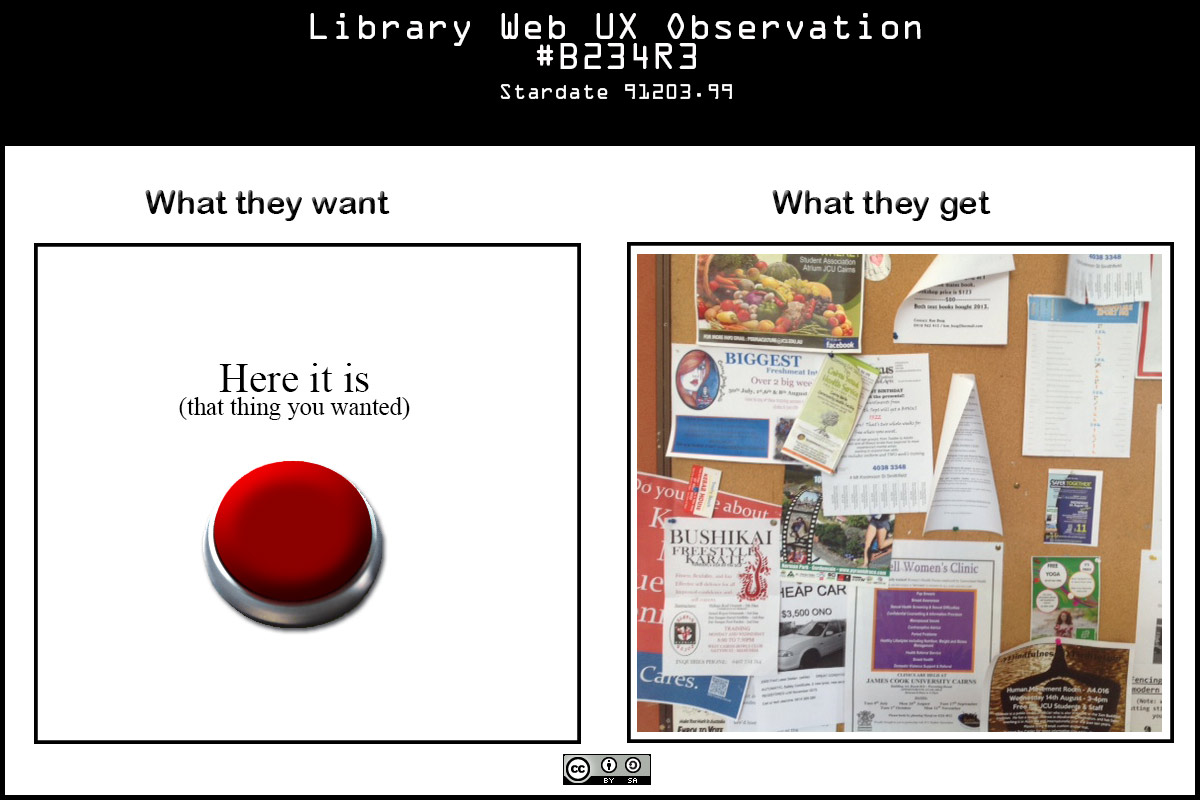
My UX Frustrations Visualised

I am turning into a cranky old man - I can only apologise to my colleagues for having to put up with my tirades. They seemed to like Steve Krug's 'Don't Make Me Think', but the home page remains a regular battleground. I know compromises have to be made - but the compromises always seem to cost the users.  So to vent some steam and publicly apologise for my crankiness I resort to faux visualisation:

This is what you want, this is what you get CC-BY-SA Alan Cockerill

Monday, July 29, 2013

Shifting shores of digital music

Just some random thoughts sparked by seeing the 'Spotify is killing iTunes' story in the Australian Financial Review that got a mention on ABC24 this morning.

First it was underlining what you read in the tech press about the future all the time, i.e. things are changing quicker.

That the iTunes store has moved from being the snarky young punk the of music distribution business to an overlord in decline, in barely a decade,  is semi-startling.

The ultra-personalised digital world is here, well it's been here for a while but now it's slapping us in the face.

There are some pretty obvious parallels between the ebook and music publishing businesses. What significance for libraries does the apparent coming triumph of streaming/rental over download/own have for us?

Does our ingrained love of the book (the owned object containing fixed information) have as much cachet with Gen Z as it does with boomers? Will information be completely fluid, will all knowledge be a constantly moving mashup?  Maybe it is already. Maybe it always was.

Extrapolating on the moves:
  • from ownership, to rental, to instant access; 
  • from album to song;  
  • from labels dictating taste on large scale to an explosion of gatekeepers directing increasingly specialised taste groups; 
  • from music news from formal publishing and broadcast channels to social media-enhanced word-of-mouth
  • from the recording being the income generator to being merely a promotional tool for gig attendance
 I had a vision.

A vision where a cadre of multitalented individuals visit tiny online communities, opening their ears to great sounds from far off (out) places and moving to the next community.  Ladies and gentlemen, I give you the digital troubadour.


Thursday, July 18, 2013

Random thought: The limits of Google Analytics - it's just data, not information

I'm still wading through Google Analytics to get an idea of how the web site is used so I can have some 'evidence-based' proposals for the site home page and persistent navigation.

One thing that I'm pondering after my last blog post is referrals from Search Engines. If a page is linked to much more often from a search engine results page (SERP) than from another page in your site does that indicate your site is failing the user, or that the user prefers to use a search engine?

If a page is a common exit point does that mean it satisfied the user need, or did it just frustrate them enough to give up?  Does an elongated 'time on page' mean the content engrossed the reader or that they glazed over into catatonia?

If your total page hits go up down after a redesign does that mean you lost popularity or your site is providing the required content with a lot less clicks?

I think I could argue two opposite sides to almost anything Analytics appears to hint at - each supposition on a facet of Analytics would probably make an ideal topic for a formal debate in the vein of 'can money by happiness' or 'is honesty the best policy'

The answer is site Analytics on their own are ambiguous guides to user behaviour - you really need to observe, consult and 'know' your users. 

Analytics' value is in aggregating data so you can visualise behaviours that prompts you to formulate questions like WHY IS IT DOING THAT? IS THAT A GOOD THING?

If only users could be consulted in large numbers at any time that was convenient to me.

PS GA has some tables of Google Queries mapped against how often a page from your site  appeared in a SERP and how often one of your pages was clicked on, referred to as CTR (Click Through Rate).  It makes for interesting perusing, maybe one approach would be to interpret user goal from the search, and then see how closely the target page matched or referred to the goal.  An iterative approach that would probably improve user experience over time, but it would be difficult evaluate the impact.

Analysis of that information is making me think about using Summon's Best Bets

Thursday, July 11, 2013

Google Analytics 101: tracking down causes of page hit anomalies

I'm no Google Analytics guru, by any stretch, but over time my understanding and GA's powers seem to be incrementally increasing.  This post is about how GA helped me understand why a particular page ranks high in page hits on our site. If you are not very familiar with GA it may help you a little.

I'm preparing to revamp our web site to work with new responsive web design templates - these will significantly change the access points to our information architecture, but not the architecture itself. Anyway, part of my prep is confirming what clients are accessing most often and greasing the path to it.

This page comes to my attention:
Types of Information Sources - Primary, Secondary, Tertiary & Refereed Journals
Pretty dry supplementary information for information literacy programs I thought. Might get a few clicks at the start of each semester, maybe.

According to GA it was the twelfth most popular page on our website in the first 6 months of 2013 (of currently 1106 pages). Over 12,000 unique page hits.

'Oh noes' I think. Do I have to put a link to it in a prominent place? Who is using this. Why?

So first I use GA  to get a sense of how people are getting to this page, using the content  and navigation summary features (see screencast below)


So what can I learn about why people are being referred to a particular page? What does GA tell us about Google search referrals? Using Traffic Sources, Landing Pages and Search/Organic and Keywords ('nother screencast)


Mystery solved, that particular page appears at the top the Google SERP for types of information.  I can with confidence not worry about whether it should be more prominent in our site structure and nav - the vast majority of use is from a Google search done by the wider public.

Lesson learned - don't accept page hits the concrete truth about how your primary clients are using your site.

Thank you Mister Google.

Monday, April 29, 2013

Our Imaginary Scorecard (Part 2 of Library Intranets in Academia: Chicken nipples and fish boots?)

Welcome to part 2 of this journey into an Academic Library Intranet Review.
In Part 1 I sketched out the technologies, content and management practices of our current Intranet.

What is an Intranet?

To me an intranet is a business tool that provides access (in the broadest sense) to information and applications using network protocols (in the broadest sense) to assist the staff achieve organisational goals (not going to say 'in the broadest sense' this time but will add the caveat that the assistance to achievement can be indirect, say for example if an corporate goal was to sell x widgets, then it's conceivable that an intranet with bulletin board for staff interaction could lead to a conversation that identified a previously untapped market segment in a different geographic location).

For maximum impact minimum effort I think it is useful to consider what Intranet is meant to do and consider our experience. I'm basing this on the Wikipedia description of an Intranet.

Imaginary Scorecard

So how does our Intranet stack up against the key functions laid out in Wikipedia in my hypercritical opinion?

1. Workforce productivity

Wikipedia says: Intranets can help users to locate and view information faster and use applications relevant to their roles and responsibilities (...) increasing employees' ability to perform their jobs faster, more accurately, and with confidence that they have the right information. It also helps to improve the services provided to the users.

My Subjective Score 2/10

Alan Says: With no search engine and an Information Architecture partially based on organisational structure finding relevant information is only slightly easier than on our team silo file shares. Due to poor (or no) information management compliance there is lots of duplication, no way of checking if the version of a document you have found is the latest, and massive document bloat from the archiving of items without thought to their lifecycle.  When functions cut across team boundaries more confusion and duplication ensues.  All staff I've talked to bemoan the lack of a search engine and new staff are very bemused when faced with where to look for a document, often not realising there are team file shares as well as the Intranet. There are no codified rules for what type of information goes where.

2. Time

Wikipedia says: Intranets allow organizations to distribute information to employees on an as-needed basis; Employees may link to relevant information at their convenience, rather than being distracted indiscriminately by email.

My Subjective Score 3/10

Alan Says: While we are generally quite good at storing information that will be retrieved on an as needed basis (various statistics, team reports, workshop videos, strategic plans and project monitoring documents). We fail on making them findable - and often we opt to link to these documents in emails to help people find them, so apart from the email storage space we save we haven't really cut down indiscriminate email. Often there isn't an awareness in staff that the Intranet will hold the information they seek.

3. Communication

Wikipedia says: Intranets can serve as powerful tools for communication within an organization, vertically strategic initiatives that have a global reach throughout the organization. The type of information that can easily be conveyed is the purpose of the initiative and what the initiative is aiming to achieve, who is driving the initiative, results achieved to date, and who to speak to for more information. By providing this information on the intranet, staff have the opportunity to keep up-to-date with the strategic focus of the organization. Some examples of communication would be chat, email, and or blogs. A great real world example of where an intranet helped a company communicate is when Nestle had a number of food processing plants in Scandinavia. Their central support system had to deal with a number of queries every day. When Nestle decided to invest in an intranet, they quickly realized the savings. McGovern says the savings from the reduction in query calls was substantially greater than the investment in the intranet.

My Subjective Score 3/10

Alan Says: We are pretty good about top down communication via our Intranet in the more strategic end of the spectrum, but on operational matters we fall down, there is no one clear channel for sharing current issues/workarounds/fixes.  We've tried so many things, the JustBetweenUs newsletter has died another death after we tried rehosting it within Blackboard. We don't maintain any sort of a searchable knowledge base of common issues/solutions. The documentation for a known issue is just as likely to be in a web page, libguide, intranet page, poster, printed handout, blog entry, email, streaming media outlet or someone's head.

Particularly disappointing was the University's roll out of ServiceNow (complete with CRM/KB functionality) that we were not invited to participate in.

Being multi campus and geographically isolated from each other we are trying various techniques to share information - we have sessions where local experts discuss something widely relevant (and these are recorded and stored on the Intranet) and we are increasingly using video conferencing and telepresence tools. We are also toying with twitter and tumblr as possible ways of more generally sharing internal news and professional development materials.

In this year's operational plan there are a skills audit and reviews of our internal communications and marketing which overlap fortuitously with an Intranet review.

4. Web publishing 

Wikipedia says: Allows cumbersome corporate knowledge to be maintained and easily accessed throughout the company using hypermedia and Web technologies. Examples include: employee manuals, benefits documents, company policies, business standards, news feeds, and even training, can be accessed using common Internet standards (Acrobat files, Flash files, CGI applications). Because each business unit can update the online copy of a document, the most recent version is usually available to employees using the intranet.

My Subjective Score 4/10

Alan Says: We do make procedures, training materials, even blog and twitter feeds available through the Intranet - but we fall down in the idea that the only version is the Intranet version, a lot of operational procedure documentation is stored on file shares we have little confidence that the version of a procedure is the latest, or only available, one.

There is patchy understanding across the organisation of information management practices as they relate to document structure and life cycle. Few staff use embedded metadata to record additional information about the document and its creation and maintenance. Word is our most popular document creation tool, HTML skills are not widely held, and the primacy of print is still evident. An understanding of the value of marking up content in heading hierarchies in Word documents is not widespread, although the public website through UCM does require a knowledge of style application for successful web publishing (Word source documents are harvested into XML and UCM then publishes them as HTML for viewing (or Word for editing), the process limits you from higher Word and HTML functionality.

5. Business operations and management 

Wikipedia says: Intranets are also being used as a platform for developing and deploying applications to support business operations and decisions across the internetworked enterprise.

My Subjective Score 5/10

Alan Says:We don't do a lot of this, although we do have some gadgets using PHP and JS to perform repetitive tasks that are vulnerable to human error if done manually (constructing proxied URLs for example).  Enterprise systems for the most part fall outside the scope of the Library Intranet, and are more likely provided by other business unit's extranets (Finance reports and HR systems, for example).  The intranet has been used to develop packages for later deployment into Blackboard - but for the most part the current Operating Environment is very cutback Apache  - no scope for introducing PHP libraries or MySQL for example, we do this on other servers as either public web or extranet.

6. Cost-effective 

Wikipedia says: Users can view information and data via web-browser rather than maintaining physical documents such as procedure manuals, internal phone list and requisition forms. This can potentially save the business money on printing, duplicating documents, and the environment as well as document maintenance overhead. [HR example removed]

My Subjective Score 7/10

Alan Says: Mostly we do not rely on large printed procedural manuals, although quite often it is staff preference to print out a copy of an oft repeated procedure - which can make promoting awareness to  the changes in master documents problematic, particularly if a staff member is absent when a change notification is circulated. We are long past needing a printed phone directory, but printed lists of library staff telephone numbers are still regularly distributed.

7. Enhance collaboration 

Wikipedia says: Information is easily accessible by all authorised users, which enables teamwork.

My Subjective Score 4/10

Alan Says: While all staff have access to the Intranet there is little document collaboration. Publishing is restricted to a small group of staff, based on skills alone (everyone has write permissions). Dreamweaver use (or html editing) is not a widespread skill.  The team silo file shares have been partially opened up but I doubt many staff have access to every share.  The faculty and liaison librarians in Townsville and Cairns did initiate using the Intranet to share Information Literacy training materials (saving documents to it as a SAMBA file share, but navigating via the web using some simple scripts I hacked together to list files and traverse folders).  Usage stats indicate it isn't getting much use. My gut tells me what collaboration on documents there is, is managed using email attachments and 'Track Changes'.

8. Built for one audience

Wikipedia says: Many companies dictate computer specifications which, in turn, may allow Intranet developers to write applications that only have to work on one browser (no cross-browser compatibility issues). Being able to specifically address your "viewer" is a great advantage. Since Intranets are user-specific (requiring database/network authentication prior to access), you know exactly who you are interfacing with and can personalize your Intranet based on role (job title, department) or individual ("Congratulations Jane, on your 3rd year with our company!").

My Subjective Score 0/10

Alan Says: We do have homogenous IT (Windows 7) although any browser is possible most staff use one of the three most popular  (IE, FF and Chrome). The number of tablet computers is expanding as well, I think least a quarter of staff would have one or a smart phone. We have the technical capability of customising the Intranet experience based on the identity of the user this have never been done.

9. Promote common corporate culture 

Wikipedia says: Every user has the ability to view the same information within the Intranet.

My Subjective Score 8/10

Alan Says: Generally the higher levels of management are committed to placing documents on the Intranet where all staff can see them. I mark our Intranet down on how easily findable these documents are, and also subtract a mark because it appears our corporate culture is such that we would rarely look for those documents in any case.

10. Immediate updates

Wikipedia says: When dealing with the public in any capacity, laws, specifications, and parameters can change. Intranets make it possible to provide your audience with "live" changes so they are kept up-to-date, which can limit a company's liability.

My Subjective Score 2/10

Alan Says: Editing and adding items is cumbersome, there is no organisational commitment to using the Intranet for this purpose, and generally it is not in our corporate DNA to look for information when we can ask someone else.


11. Supports a distributed computing architecture

Wikipedia says: The intranet can also be linked to a company’s management information system, for example a time keeping system.

My Subjective Score 2/10

Alan Says: The current operating environment is restrictive in terms of coding possibilities, and generally management information systems are either rudimentary (if in house) or are black boxes controlled by other business units with other priorities.